


MG
Complete and very useful for podcasters
I've never owned an interface that had no instrument inputs so that was a first. This product is directed towards podcasters and not musicians. However, you could enter 1 instrument or sound creating device through the "phone" TRS input.
Even though pretty much everything is plastic, the build quality is solid. The headphones are very comfortable and clear. The microphone is not top of the line audiophile level, but it is a massive upgrade if you use internal mics from your device or a all in one USB mic.
The device worked out of the box directly on apple, without software or drivers. The registry was easy since it auto-filled the serial. Very intuitive interface with easy operation. The bluetooth phone connection worked perfectly even with an old Iphone.
Overall I was very pleasantly surprised with the overall quality, except for the XLR cable which did not work at all. Replacing it did the trick.
Positive:
- High sound quality
- Sturdy contruction
- Easy and versatile connectivity
- Power switch
- Clear and easy software, easy registry
- Plug and play
Negatives:
- XLR cable was completely busted out of the box
- No "real" instrument input. (irrelevant for podcasters only)
Even though pretty much everything is plastic, the build quality is solid. The headphones are very comfortable and clear. The microphone is not top of the line audiophile level, but it is a massive upgrade if you use internal mics from your device or a all in one USB mic.
The device worked out of the box directly on apple, without software or drivers. The registry was easy since it auto-filled the serial. Very intuitive interface with easy operation. The bluetooth phone connection worked perfectly even with an old Iphone.
Overall I was very pleasantly surprised with the overall quality, except for the XLR cable which did not work at all. Replacing it did the trick.
Positive:
- High sound quality
- Sturdy contruction
- Easy and versatile connectivity
- Power switch
- Clear and easy software, easy registry
- Plug and play
Negatives:
- XLR cable was completely busted out of the box
- No "real" instrument input. (irrelevant for podcasters only)
7
0
Report
J7
Focusrite Vocaster Two Studio – A Streamlined Voice Toolkit with Substance
As a semi-professional working across podcasting, voiceover, and the occasional remote interview, I’ve used my share of gear that promises convenience and delivers compromise. The Focusrite Vocaster Two Studio stands out by actually making the recording process easier without undermining audio quality—something I didn’t quite expect at this price point.
Design & Setup
Out of the box, the setup is genuinely quick. The interface is compact and cleanly laid out, with smart visual cues (gain ring meters!) and tactile, clearly labeled controls. It’s clearly designed for a creator’s workflow—not a studio rat’s—but that’s not a criticism. This thing lives on the desk, not in a rack, and it fits that role perfectly.
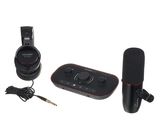
The DM14v dynamic mic is no-nonsense, with a tight pickup pattern that makes untreated rooms less of a problem. The HP60v headphones aren’t studio reference-grade, but they’re detailed enough to catch plosives, noise issues, and tone. Together, they make a surprisingly competent voice chain for spoken-word content.
Preamps That Pull Their Weight
The biggest technical win here is the preamps—with up to 70 dB of gain, they handle gain-hungry mics like the SM7B or RE20 without complaint. And not just with volume—they’re clean. I tested side-by-side with a Scarlett 2i2 and found the noise floor noticeably lower at high gain.
That alone is worth noting. Add in the fact that the unit has built-in loopback, mix-minus for call-ins, and a second mic input, and you start seeing the edge this has over traditional beginner interfaces.
Voice Features That Aren’t Gimmicks
Where this setup leans into its podcast/creator audience is the Auto Gain and Voice Enhancer presets. These features could easily be throwaways—but they aren’t. The Auto Gain actually works, setting usable levels within seconds. The Voice Enhancer options (Clean, Warm, Bright) are subtle and well-EQ’d. I wouldn’t use them on a mastered track, but for fast turnaround content? Gold.
Bluetooth audio input and dual headphone outs round it out nicely—no need to patch in awkward adapters or third-party routing software.
Vocaster Hub – Simple, But It Works
The companion software does what it should: routing, monitoring, and fine-tuning. It’s not a DAW replacement, and it’s not trying to be. But it does mean you’re not diving into system settings every time you record a Zoom call or want to monitor playback.
The included software bundle is generous if you’re just getting started, though as someone already living in Reaper and RX, I didn’t get much from it.
Where It Falls Short
It’s not a full studio interface. There are no line inputs, no MIDI, no per-channel phantom power. And while the mic and headphones are solid, anyone already invested in better gear won’t be swapping out their RE20 or DT 770s.
But here’s the thing: that’s not what this kit is for. This is for creators who need reliable, good-sounding audio with minimal fuss—and it nails that brief.
Bottom Line
The Vocaster Two Studio isn’t about bells and whistles—it’s about frictionless workflow for voice-first creators. It’s rare that gear at this level feels so purpose-built. If your priority is capturing clear, professional voice recordings quickly and consistently, this setup earns its place on your desk.
Rating: 4.5/5
Design & Setup
Out of the box, the setup is genuinely quick. The interface is compact and cleanly laid out, with smart visual cues (gain ring meters!) and tactile, clearly labeled controls. It’s clearly designed for a creator’s workflow—not a studio rat’s—but that’s not a criticism. This thing lives on the desk, not in a rack, and it fits that role perfectly.
The DM14v dynamic mic is no-nonsense, with a tight pickup pattern that makes untreated rooms less of a problem. The HP60v headphones aren’t studio reference-grade, but they’re detailed enough to catch plosives, noise issues, and tone. Together, they make a surprisingly competent voice chain for spoken-word content.
Preamps That Pull Their Weight
The biggest technical win here is the preamps—with up to 70 dB of gain, they handle gain-hungry mics like the SM7B or RE20 without complaint. And not just with volume—they’re clean. I tested side-by-side with a Scarlett 2i2 and found the noise floor noticeably lower at high gain.
That alone is worth noting. Add in the fact that the unit has built-in loopback, mix-minus for call-ins, and a second mic input, and you start seeing the edge this has over traditional beginner interfaces.
Voice Features That Aren’t Gimmicks
Where this setup leans into its podcast/creator audience is the Auto Gain and Voice Enhancer presets. These features could easily be throwaways—but they aren’t. The Auto Gain actually works, setting usable levels within seconds. The Voice Enhancer options (Clean, Warm, Bright) are subtle and well-EQ’d. I wouldn’t use them on a mastered track, but for fast turnaround content? Gold.
Bluetooth audio input and dual headphone outs round it out nicely—no need to patch in awkward adapters or third-party routing software.
Vocaster Hub – Simple, But It Works
The companion software does what it should: routing, monitoring, and fine-tuning. It’s not a DAW replacement, and it’s not trying to be. But it does mean you’re not diving into system settings every time you record a Zoom call or want to monitor playback.
The included software bundle is generous if you’re just getting started, though as someone already living in Reaper and RX, I didn’t get much from it.
Where It Falls Short
It’s not a full studio interface. There are no line inputs, no MIDI, no per-channel phantom power. And while the mic and headphones are solid, anyone already invested in better gear won’t be swapping out their RE20 or DT 770s.
But here’s the thing: that’s not what this kit is for. This is for creators who need reliable, good-sounding audio with minimal fuss—and it nails that brief.
Bottom Line
The Vocaster Two Studio isn’t about bells and whistles—it’s about frictionless workflow for voice-first creators. It’s rare that gear at this level feels so purpose-built. If your priority is capturing clear, professional voice recordings quickly and consistently, this setup earns its place on your desk.
Rating: 4.5/5
0
0
Report
M
Perfect for podcasting and online meetings
I use it for online meetings, phone calls
It is excellent for this purpose.
I like it so much
The headset little rigid
The mic is more than perfect
The sound card is perfect
It is excellent for this purpose.
I like it so much
The headset little rigid
The mic is more than perfect
The sound card is perfect
2
0
Report
K
Awesome piece of kit!!
The interface is very easy to use, and can be plugged straight into your phone if you use this as your main recording device. The microphone has a good weight to it and feels of premium quality. The sound is great. It's really easy to use. At the current price it's an absolute steal, even the headphones are of really good quality. Very happy with my purchase.
2
0
Report
H
Amazing PODCAST/INTERVIEW tool
There is NOT a single reviewer in YOUTUBE to showcase the fact that you do NOT need absolutely NO software to create any recordings.
You just need a typical Audio Recorder connected at the output of your VOCASTER 2 STUDIO.
You just need a typical Audio Recorder connected at the output of your VOCASTER 2 STUDIO.
2
0
Report
彪
This bundle is an incredible value. You’ll get a solid microphone, a great pair of headphones, and an external audio interface. The whole setup is optimized for voice conversations and interviews.
I own plenty of gear, and this kit opens up tons of creative possibilities. I can mix and match all its components freely. The build and sound quality are excellent, while the price is extremely affordable.
I own plenty of gear, and this kit opens up tons of creative possibilities. I can mix and match all its components freely. The build and sound quality are excellent, while the price is extremely affordable.
0
0
Report
r
Best value
For 99€, this is very good in terms of sound quality, build quality and what all it has in the bundle. Relatively easy to setup and use. Headphones are kind of lackluster, but when using an equalizer they sound much better.
1
0
Report
Se
Use with Linux or MacOS. Windows drivers are flaky.
Windows drivers are flaky - random lags, audio repeating itself -, I don't recommend using them. On Linux, since 6.1, drivers are included in the kernel, so it works out of the box in there. MacOS also works well.
0
0
Report
J
Brilliant starter podcasting kit
This set is a godsend for anyone thinking of starting their own podcast - whether they're pros or complete amateurs. It's an all-in-one solution that lets you start interviewing immediately .
Additionally, this thing solves one of the biggest annoyances in a journalist's life - phone interview recording. GOne are the days of microphones awkwardly stuck in your ear or shady (or expensve) apps that only work when they fell like it. Just connect your phone via bluetooth and... voila!
Additionally, this thing solves one of the biggest annoyances in a journalist's life - phone interview recording. GOne are the days of microphones awkwardly stuck in your ear or shady (or expensve) apps that only work when they fell like it. Just connect your phone via bluetooth and... voila!
1
0
Report
b
super pour les streamers
je trouve ce produit genial pour les persones qui font des lives sur tiktok live studio ou sur obs et vous pouvez le brancher a un irig pour faire vos lives sur votre telephone je le recommade je l'utilise tous les jours
0
0
Report