


Ableton Live 12 Intro



Audio MIDI Sequencer (DAW) (download)
- Software for recording and editing audio and MIDI instruments, for intuitive composing and producing, for live performances and much more.
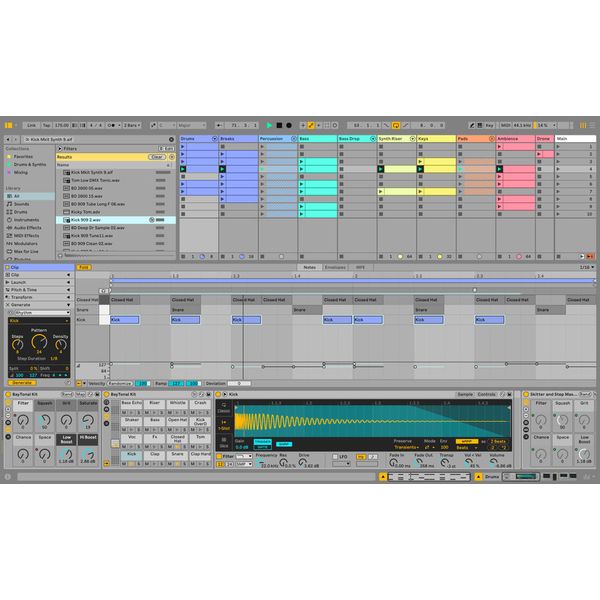
- Non-linear session view with clips, scenes, clip automation etc. as a creative musical playground, for jamming and improvisation, for flexible stage shows and many other applications
- Linear arrangement view enables classic working methods with sequences arranged in a bar or time grid
- Numerous innovative tools such as tuning systems, keys and scales for adapting to a given key, searching for similar sounds in the library, assigning your own tags and browser labels, a browser history and much more.
- Screen reader support for easier control with impaired vision
- Extensive individual control options via MIDI and automatic mapping for many common hardware controllers
- Comping function for audio and MIDI recordings to create an overall take from several recording sessions
- Dynamic tempo adjustment automatically to incoming audio signal
- Adjustable probability for notes and velocity values for random changes
- Support for MPE (MIDI Polyphonic Expression)
- Pitch shifting and time stretching in real time
- Browser with pre-listening function at project tempo
- Capture enables ideas to be subsequently recorded on MIDI tracks
- Group tracks with multiple levels
- Audio resolution: 32 bit / 192khz
- 16 Audio and MIDI tracks with 16 scenes
- 2 Send and return tracks
- Up to 8 audio inputs and outputs
- Integration of external instruments
- Included instruments: Drift, Drum Rack, Impulse, Simpler CV Instrument and CV Triggers as well as Instrument Racks
- 27 Audio effects
- 12 MIDI effects
- 4 packs with more than 5 GB samples
- Supports MP3, FLAC and WAVPACK export
System Requirements
- Version: 12
- Format: E-Mail
- License validity: perpetual
- Copy protection: Online activation
- Simultaneous activations: 2
- Windows: from 10 (64-Bit)
- Mac OS (64 Bit): from 11
- CPU min.: AMD Ryzen, Apple Silicon, Intel Core i5 ab 5. Generation (Unterstützung AVX2 Instruction set)
- RAM min. (GB): 8
- min Space on HD (GB): 3 GB
- Display: 1366 x 768
- Additional System requirements: Internet Connection for Installation and Activation, ASIO-comp. Audiointerface (Windows)
-
Available since March 2024
-
Item number 587431
-
Sales Unit 1 piece(s)
-
max. Samplerate (kHz) 192 kHz
-
Max. resolution in bit 32 bit
-
Hardware In/Outs 8
-
Audio Tracks 16
-
MIDI Tracks 16
-
Instrument Tracks 16
-
Pitch Yes
-
Clip-Matrix Yes
-
Notation No
-
Video-Playback Yes
-
Surround Support No
-
Virtual Instruments 6
-
Effects 27
-
Library (GB) 5 GB
-
AAX DSP No
-
AAX native No
-
ARA No
-
Audio Units Yes
-
VST2 Yes
-
VST3 Yes
-
Download Yes
-
Audio Import Formats AIFF, FLAC, MP3, OGG, WAV
-
Audio Export Formats AIFF, FLAC, MP3, WAV
-
Copy protection Online activation
-
Show variations of this product

Bundles & offers
